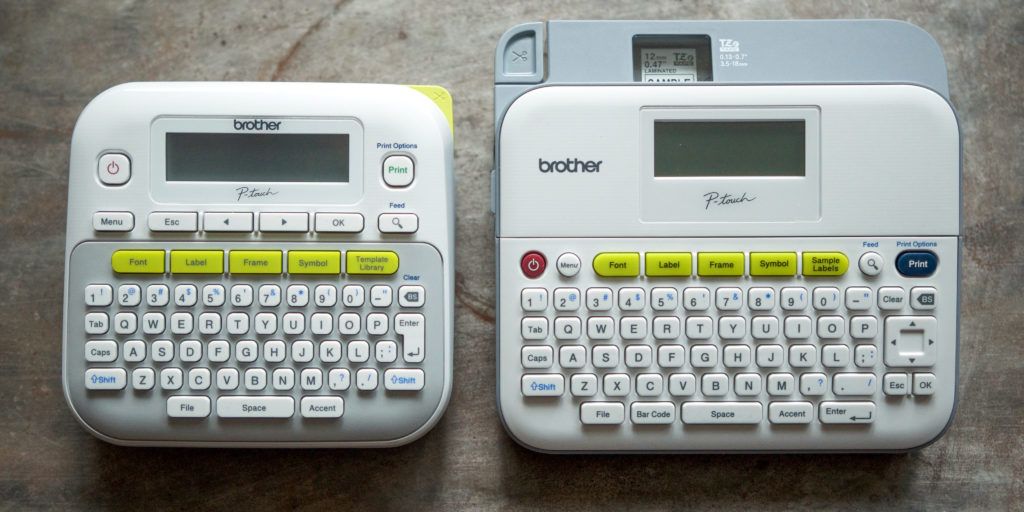
A label maker is a small purchase with a long tail. The machine is usually simple; tape cartridges are the recurring cost, and the wrong printing method becomes irritating every time you need a label quickly. For most homes and small offices, buy the Brother P-touch PT-D220. It has a real QWERTY keyboard, prints durable laminated TZe tape, works without a phone, and accepts tape from 3.5 mm to 12 mm wide. It is the least complicated way to label files, pantry bins, chargers, shelves, and storage boxes.
The DYMO LetraTag 200B is the better choice if you prefer designing labels on a phone. It connects over Bluetooth Low Energy and uses the LetraTag Connect app, which is useful when you want saved templates or a cleaner keyboard than a small handheld device can offer. For cables, faceplates, and a tool bag, choose the Brother P-touch EDGE PT-E110. Its dedicated cable-wrap, cable-flag, and faceplate functions solve a different problem from a home organizer.
Quick picks
| Pick | Who it is for | What it gives up |
|---|---|---|
| Brother PT-D220 | Home and home-office labels made without an app | 12 mm maximum tape width and six AAA batteries or an optional adapter |
| DYMO LetraTag 200B | People who want to compose labels on a phone or tablet | It depends on the app and uses 12 mm LetraTag tapes |
| Brother PT-E110 | Cables, panels, and equipment identification | It costs more and is excessive for pantry jars |
The Brother PT-D220 is the home label maker to buy
Brother’s P-touch PT-D220 wins because it lets you make a label at the moment you need one. There is no pairing, subscription, login, or app update between you and a storage bin. Type on the QWERTY keyboard, preview the line on the small display, and print. That ordinary workflow is a better fit for a shared kitchen, household desk, or small office than a more elaborate connected printer.
Brother specifies a maximum tape width of 12 mm, roughly one-half inch, with compatible TZe tape widths of 3.5, 6, 9, and 12 mm. That range covers the labels most people actually use. Narrow tape works on charging cables, small spice containers, folders, and pencil drawers. The 12 mm tape is more readable on storage boxes, shelves, binders, and appliance cables. The PT-D220 can print up to two lines, which is enough for a category label plus a smaller detail when the tape is wide enough.
The machine has 14 fonts, 11 styles, 99 frames, a label preview, 25 templates, and room for saved labels. Those options are useful in moderation. A storage system works when labels are consistent and readable, not when every bin has a decorative border. Settle on one type style, use a larger label where viewing distance demands it, and save repeated labels only if you will actually print them again.
Its main advantage is the tape system. Genuine Brother TZe tapes are laminated, and Brother lists water, fade, and chemical resistance for the line. The tape family also includes flexible-ID, extra-strength adhesive, acid-free, tamper-evident, and iron-on fabric variants. That does not mean one white plastic tape is correct everywhere. Match the tape to the surface: flexible tape for a wrapped cable, standard laminated tape for a shelf, and a removable solution when you are labeling something temporary.
The trade-off is power. The PT-D220 runs on six AAA batteries or an optional AC adapter. If it will stay on one desk and you make labels frequently, the adapter is worth considering. If it comes out for a seasonal organization project, batteries are simpler. It is also a standalone device, so its display and keyboard are less comfortable for a long list than a phone screen. That is a reasonable compromise for a label maker that still works when a phone is charging or unavailable.
Check PT-D220-compatible TZe tape options on Amazon before you buy a large bundle. The printer is affordable because tape is a continuing purchase; choose two or three tapes that match actual projects instead of a variety pack filled with colors you will never use.
Choose the DYMO LetraTag 200B for app-based labeling
The DYMO LetraTag 200B makes sense when your phone is already the place you plan and organize. It uses Bluetooth Low Energy and the LetraTag Connect app on supported Android and iOS devices. The printer is compact, uses 12 mm LetraTag tapes, and prints at 160 dpi. DYMO states that it can print up to two lines and uses four AA batteries.
The app is the reason to choose it. A phone screen makes it easier to type longer names, duplicate a series of pantry labels, pick a border, or save a template. It is also helpful if multiple people want the same label style without passing around a handheld device. The app can be genuinely convenient for an organization project spread across a room, especially when you are making dozens of labels and want to avoid retyping each category.
The app is also the limitation. A label maker that depends on a phone inherits its familiar friction: an operating-system update, an unavailable battery, a Bluetooth connection that needs attention, or an app someone else does not have. The LetraTag 200B is a good choice if that trade feels normal to you. Do not buy it hoping to avoid a keyboard and then resent opening an app for one cable label. For those one-off moments, the Brother is easier.
DYMO offers paper, clear, opaque plastic, and iron-on textile LetraTag tapes. Paper labels are fine for files, jars kept indoors, and projects where replacement is expected. Use plastic tapes when moisture or handling is more likely. The tape type matters more than a clever font. A beautiful paper label will still fail on a cold, damp garage bin; a plain plastic label can work well for years in the right place.
The LetraTag 200B is not a replacement for an industrial labeler. It is designed for home and home-office organization, and its 12 mm tape width is a sensible ceiling for that role. See LetraTag tape choices on Amazon and confirm the cassette type before ordering; label tape names are not interchangeable across printer families.
Buy the Brother PT-E110 when your labels go on cables and equipment
The Brother P-touch EDGE PT-E110 is a specialist pick. It accepts laminated TZe and HGe tape in 3.5, 6, 9, and 12 mm widths, prints at up to 20 mm per second, and includes dedicated application keys for cable wrap, cable flag, and faceplate labels. It also supports serialization, which saves real time when a set of items needs sequential names.
Those application keys are not decoration. A cable-wrap label needs a layout that remains readable when the cable curves; a cable flag label needs enough material to fold back on itself; a faceplate label needs different spacing again. A general home machine can print words on tape, but it will not necessarily make the right geometry effortless. The PT-E110 lowers that friction for small electrical, network, audio, and workshop jobs.
Brother positions the PT-E110 as a compact handheld industrial label printer. It uses six AAA batteries, with an optional AC adapter, and has a two-year limited exchange warranty. That support and the job-specific media make it a credible work-tool purchase. They also make it unnecessary for someone labeling a pantry. The bright orange body and more purposeful features will not improve a label on a cereal bin. Buy it when you need its functions, not because it appears tougher.
For cables at home, a 6 mm flexible-ID tape and clear concise text are usually enough. Label both ends of a cable, use the same name as your router or power strip, and leave a little slack so a label does not sit under constant tension. You can find compatible Brother flexible-ID tape on Amazon. Check compatibility with the exact printer before purchasing, since Brother sells several tape families.
How to choose tape before you choose a printer
Start with the surface and the label’s expected life. A pantry container that is washed by hand, a plastic storage tote, a document folder, a charger, and a basement shelf do not need the same tape. Standard laminated tape is a good general-purpose starting point. Flexible-ID tape is for curved cables. Extra-strength adhesive is for rough or textured surfaces. Iron-on fabric tape is a different material for clothing and soft goods. Paper tape is for easy indoor organization where replacement is expected.
Then consider width. A narrow label is less obtrusive and better for cables, bins with small tabs, and crowded file folders. A wider label is more legible from a few feet away and works better when it needs two lines. Do not put a long sentence on a narrow strip just because the printer permits it. Short nouns make the system easier to scan: “Charging,” “Travel adapters,” “Winter gloves,” “Router,” “Audio cable.” Add a second line only when it prevents a real mix-up.
Label color should serve contrast. Black on white is the default because it reads in most rooms. Black on clear is useful when you do not want a white rectangle on a dark device, but it can become hard to see on a busy background. White on black is visible on a dark storage system but uses more visual weight. Resist color coding until the underlying words are clear. A color system with unclear names creates work for anyone new to the room.
Build a labeling system that survives daily life
Label categories, not your hopes. “School supplies” lasts longer than a label for a particular semester. “Batteries” works better than a neat label that lists every battery size when the contents change. Use dates only for things that genuinely expire or rotate. A label that needs to be edited every week is a sign the category is too specific.
Put labels where people look for the thing, not where they look best in a photo. On bins, that is usually the front edge and sometimes the top if the bins stack. On drawers, it may be a removable label inside rather than a permanent one outside. On cables, place the label close enough to the connection to be useful but not under strain. Consistency is more valuable than perfect alignment.
A label maker becomes more useful when it supports an actual storage plan. If you need containers as well as labels, our small-space guide is less relevant than choosing a broad, simple grouping system first; label only after the storage location has earned its purpose. For documents and project notes, pair clear labels with a readable notebook system; see our notebook guide for that adjacent choice.
What we did not make a main pick
Phone-only thermal label makers such as compact app printers can be attractive because they are rechargeable and inexpensive. Many use direct thermal paper, which is convenient for temporary labels and shipping-style tasks. They are a poor first label maker for long-lived household labeling when the exact media, app, or durability is unclear. If you buy one, understand its label material and keep realistic expectations about heat, sunlight, and age.
Large desktop label printers are useful for heavy office volume, shipping labels, and barcodes. They are not necessary for cupboard bins and a few folders. Their higher cost, larger footprint, and software needs are only justified when the volume or label format demands them. Buy a printer that makes the labels you need, not the largest printer you can justify.
Care and setup
Use the tape family the printer specifies. A cassette that almost fits is not a bargain. Keep the tape compartment free of loose backing paper, cut the printed label cleanly, and do not pull tape back through the mechanism. Store spare cassettes in a dry drawer and install fresh batteries before a big organization project rather than troubleshooting a weak print halfway through.
Before applying any permanent label, clean and dry the surface. Press the tape firmly from one edge to the other to avoid trapped air, and let adhesive settle on a cool, clean surface. On a surface that gets hot, wet, oily, or flexed, test one label before committing to a whole system. That small test is more useful than trusting a package claim in the wrong environment.
Plan for tape, not just the printer
The printer cost is visible once. Tape cost appears every time you reorganize a closet, move house, add a shelf, or decide that “miscellaneous” is not a workable category. Before choosing a model, open its tape listings and make sure the basic black-on-white cartridge is easy to find in the widths you expect to use. The best printer is a poor value if its ordinary replacement tape is difficult to buy where you live.
Keep one everyday tape loaded and one spare in the drawer. Black on white at 12 mm is the sensible default for bins and files; a 6 mm flexible tape is the first specialist roll worth adding for cables. Do not buy a dozen finishes before the system exists. Specialty colors, metallic tapes, and decorative borders make sense for a specific project, but they should not become a substitute for clear categories.
Review labels when the organization changes. Remove a label that no longer describes what is inside instead of layering a new name over it. If a storage category repeatedly changes, broaden the label. A label maker is most useful when it reduces questions for the next person opening the drawer, including future you.
How we researched
We reviewed current manufacturer specifications for printer controls, tape compatibility, power, print width, print speed, app support, warranties, and task-specific functions. We chose models with clearly different roles and avoided treating a general organizer as an industrial cable labeler. We did not claim hands-on testing. Tape adhesion and durability vary with surface preparation, material, weather, and the specific cassette, so the guide focuses on selecting the right system before buying supplies.
Label maker questions, answered
Do I need a Bluetooth label maker?
No. It is useful when you want to design labels on a phone or save templates there. A handheld keyboard model is usually faster for occasional one-off labels.
What tape width should I buy?
Start with 12 mm for bins, shelves, and folders, then add 6 mm for cables and smaller containers. The exact printer limits which widths you can use.
Are label makers good for cables?
Yes, especially with flexible-ID tape and a printer that supports cable-wrap or cable-flag layouts. Label both ends and keep the text short.
Will all label tape fit my printer?
No. Tape families are specific to the printer. Confirm the manufacturer’s compatible cassette family and width before ordering.
Affiliate note: SuperGrail may earn a commission when you buy through an Amazon link. That does not affect our recommendations or the trade-offs we explain.